
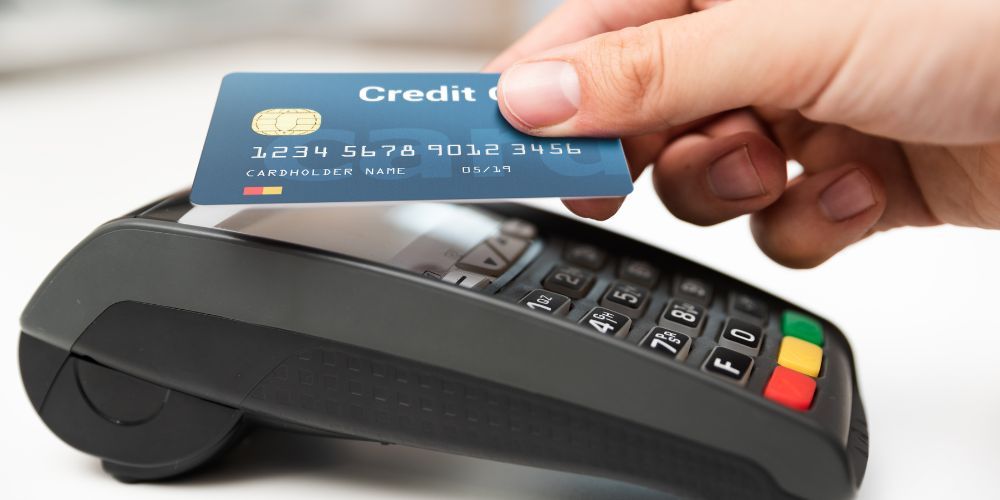
When it comes to choosing the right payment terminal for your business, the Dejavoo Z8 stands out as a popular choice. It offers a solid range of features that can handle a variety of payment methods, from chip cards to contactless payments. Whether you’re running a retail store, restaurant, or any other business that handles in-person transactions, this device promises reliability and security.
The Z8 is designed to be a versatile and efficient payment solution for small to medium-sized businesses. It’s especially useful for environments where quick and secure transactions are essential. This guide will provide a comprehensive overview of the Dejavoo Z8, including its features, benefits, and how to choose the right configuration for your business.
What is the Dejavoo Z8?
The Dejavoo Z8 is a countertop payment terminal that supports a wide range of payment options. It accepts chip cards (EMV), contactless payments, magnetic stripe cards, and even PIN debit transactions. It’s an excellent choice for businesses that want a reliable, future-proof device for processing payments.
This terminal is part of Dejavoo's Z Line, which is known for its user-friendly design and integration with various payment ecosystems. The Z8 is built on a Linux platform, offering fast processing speeds, security features, and compatibility with different payment processors.
Key Features of the Dejavoo Z8
Payment Method Compatibility
The Dejavoo Z8 supports multiple payment methods, making it ideal for businesses that need to process different types of payments. Whether your customers prefer to pay with EMV chip cards, contactless payment methods like Apple Pay, or traditional swipe cards, the Z8 can handle it all. This broad compatibility ensures that your business can keep up with evolving payment trends without missing out on any customers.
Flexible Connectivity
The Z8 offers multiple connectivity options, including dial-up, Ethernet, and Wi-Fi. This means you can choose the best connection method for your business, whether you prefer the reliability of a wired Ethernet connection or the flexibility of a wireless Wi-Fi setup. With these options, the Z8 can fit into a wide variety of business environments.
Compact and User-Friendly Design
The terminal features a 2.4-inch backlit LCD color display that makes it easy to read transaction details. The physical keypad has 15 standard keys and 6 function keys for quick and easy navigation. This makes it easy for employees to process transactions quickly and efficiently, helping improve the overall customer experience.
Built-In Thermal Printer
The Z8 comes with an integrated thermal printer for on-the-spot receipt printing. This is particularly useful for businesses that need to provide receipts to customers immediately after a transaction. The printer is capable of producing high-quality receipts, and you can even customize them with your business logo.
Security Features
Security is a major concern when dealing with payment data. The Dejavoo Z8 meets the highest security standards, including PCI PTS v4.x certification and EMV L1 and L2 certifications. These certifications ensure that the terminal is capable of securely processing payments, protecting your customers' sensitive information.
Specifications
- Display: 2.4-inch color LCD, backlit
- Processor: 32-bit, 400 MHz
- Memory: 128 MB RAM + 64 MB DDR
- Connectivity: Dial-up, Ethernet, Wi-Fi
- Printer: Integrated thermal printer
- Payment Types: EMV, NFC/contactless, swipe
- Security: PCI PTS v4.x, EMV L1/L2
- Additional Ports: USB, RS-232 (varies by version)
The Z8’s combination of specifications ensures smooth operation, fast processing, and secure transactions. Whether you’re a small retail store or a larger operation, the Z8 can handle your transaction needs efficiently.
Advantages of the Dejavoo Z8
The Dejavoo Z8 offers several advantages that make it a great choice for many businesses. One of the key benefits is its flexibility in terms of payment acceptance. With the ability to handle a variety of payment types, you can cater to customers who prefer different methods, from traditional credit and debit cards to newer mobile payment options.
Another advantage is its compact design. This makes the Z8 easy to place on any counter without taking up too much space. Whether you have a small business or a larger setup, this terminal can fit into your workspace with ease.
Additionally, the Z8’s security certifications provide peace of mind, ensuring that customer transactions are protected. This is crucial for businesses looking to meet industry standards and safeguard sensitive data.
Potential Drawbacks
While the Dejavoo Z8 has many benefits, it’s important to also consider its potential drawbacks. One downside is that it does not feature a touchscreen interface, which is common in some newer payment terminals. This may be a disadvantage for businesses that are used to working with more modern touchscreen devices.
Another consideration is compatibility. While the Z8 supports a wide range of payment methods, it’s important to confirm that it will work with your existing payment processor. Some payment processors may not offer support for the Z8, so it’s important to check compatibility before making a purchase.
How to Choose the Right Configuration
When selecting the Dejavoo Z8, you’ll need to consider a few important factors:
Connectivity Needs
Depending on your business’s setup, you’ll want to choose the appropriate connectivity option. If you have a stable internet connection, Wi-Fi or Ethernet may be the best options. However, if you need backup for potential connectivity issues, having a dial-up connection as a fallback can be beneficial.
Security and Compliance
Ensure that the Z8 meets all the security requirements for your business. This includes making sure it is PCI and EMV compliant to handle sensitive customer payment information securely.
Processor Compatibility
Before purchasing the Z8, verify that your payment processor supports the device. Some processors may require specific terminal models or configurations, so it’s important to check compatibility.
How to Set Up the Dejavoo Z8
Setting up the Z8 is relatively straightforward. Here are the basic steps:
- Unbox and Connect: Plug the device into a power source and connect it to your chosen communication method (Wi-Fi, Ethernet, or dial-up).
- Configure Settings: Set up your merchant ID, time zone, and other preferences.
- Connect to Network: If you’re using Wi-Fi, connect to your network by selecting your SSID and entering the password.
- Test a Transaction: Run a test transaction to ensure everything is working smoothly.
Once you’ve completed these steps, your Dejavoo Z8 will be ready to process payments.
Tips for Using the Dejavoo Z8
To get the most out of your Z8 terminal, here are a few helpful tips:
- Keep Firmware Updated: Regularly check for firmware updates to ensure you have the latest security features and performance improvements.
- Maintain Spare Paper Rolls: Always have extra thermal paper rolls on hand so you’re never caught off guard during peak times.
- Staff Training: Make sure your staff is trained on how to process refunds, void transactions, and handle receipts properly to avoid errors.
Conclusion
The Dejavoo Z8 is a versatile, secure, and efficient payment terminal that can support a wide range of businesses. Its combination of payment acceptance, connectivity options, and security features makes it a reliable choice for businesses looking to upgrade their payment processing systems.
Before making your purchase, ensure that the terminal is compatible with your payment processor and that it meets your business’s connectivity and security needs. With the right setup, the Dejavoo Z8 can streamline your payment process and improve your customer experience for years to come.